Windows 10 / 11 · Runs entirely on your machine

Plan, test and defend the whole engagement.

AuditLens is a desktop workstation for the full audit lifecycle. Test 100 % of a population instead of a sample. Describe an analysis in plain English and get a tool that runs on your laptop. Let an agent work the fieldwork steps while every judgment call stays yours.

One-time purchase Bring your own AI key No AuditLens server in the path

Recorded in AuditLens. Engagement, findings and costs are real app output.

The engagement, end to end

Every screen in AuditLens sits on this rail.

1 Plan & scope
2 Capture evidence
3 Test & reperform
4 Analyze & investigate
5 Conclude & report
6 Defend & sign off
0
Rows tested

The full population — not a sample of 25.

0
Exceptions found

Each one names the row, field and rule it broke.

0.3s
Local run time

Tools execute on your machine, not in the cloud.

$0.22
AI spend, engagement

Metered live in the title bar, billed by your provider.

Figures taken from the recorded sessions on this page.

Recorded in the product

Four things AuditLens does that a screenshot tool cannot

No mock-ups and no marketing renders — these are unedited captures of the shipping app, running a real ITGC engagement and a treasury review.

Plain English → working tool

Tool Studio build the analysis you actually need

Describe the test in a sentence — “join two payment exports on payment_id and flag any difference over 100” — and AuditLens writes a tool for it. One AI call builds it. Running it costs nothing, because it runs on your machine against your files. The data never goes to the model.

  • A methodology sheet, drafted from the code. Purpose, population, logic, exception definition and limitations — in review language, not source. The code becomes the appendix.
  • Review and sign-off bound to the exact version. A sign-off is a signed event against that specific code. Change the tool and the sign-off does not carry over.
  • Keep the good ones. Save a tool to your library, reuse it in any engagement, or share it with the team. Blueprints ship for IT general controls, journal entries, fraud & forensics, security operations and sampling.

100 % of the population

Population Testing stop defending a sample of 25

Point AuditLens at the whole listing and test every row. Deterministic rules decide the vast majority; AI only drafts a call on the genuinely ambiguous residue, and those rows stay flagged for your confirmation. No sample to defend. No extrapolation to argue about.

186
Rows
171
Passed
15
Failed
  • Row-level provenance. Every exception names the row, the rule it broke and the field values that broke it — mfa_registered="FALSE" ≠ "TRUE" — and whether a rule or the model decided.
  • Straight into the tracker. Push the whole exception set to the Exception Tracker as it stands, or export it to CSV.
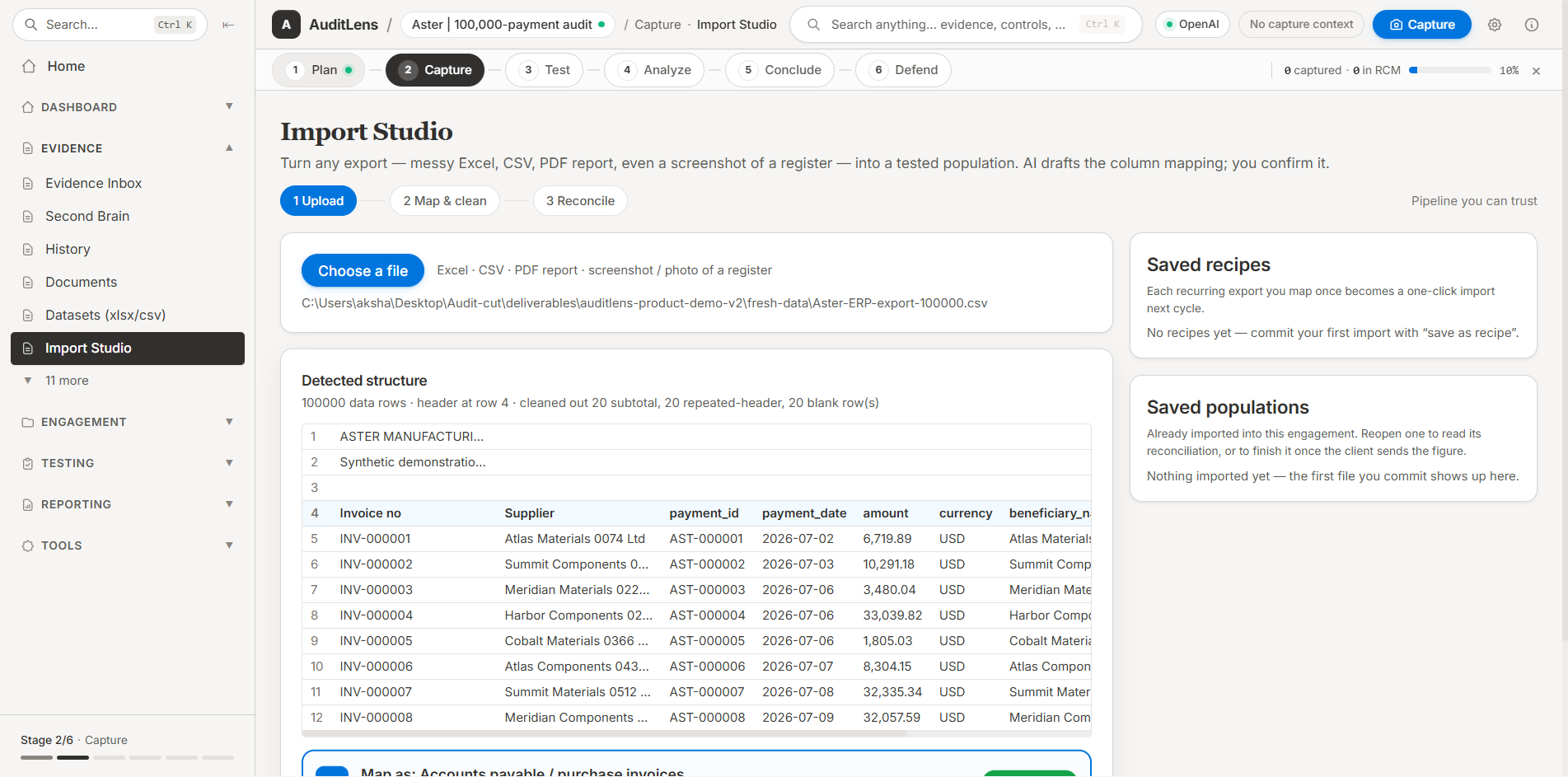
  • Pull populations from the source. Evidence Connectors reach SAP, Dynamics, Oracle, NetSuite and REST endpoints, or take a CSV/XLSX extract.

Agent-assisted fieldwork

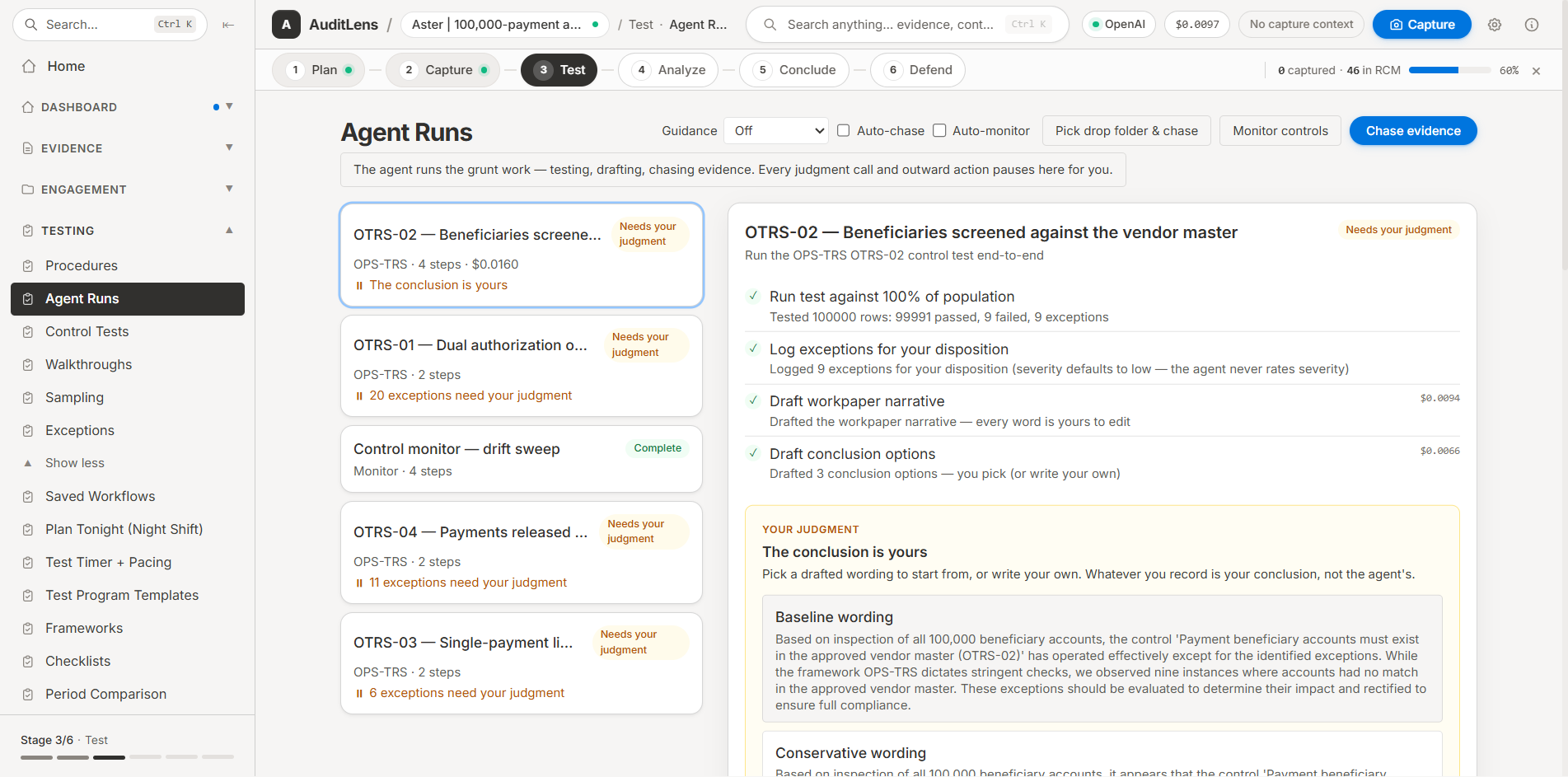
Frameworks & agent runs the agent works, you judge

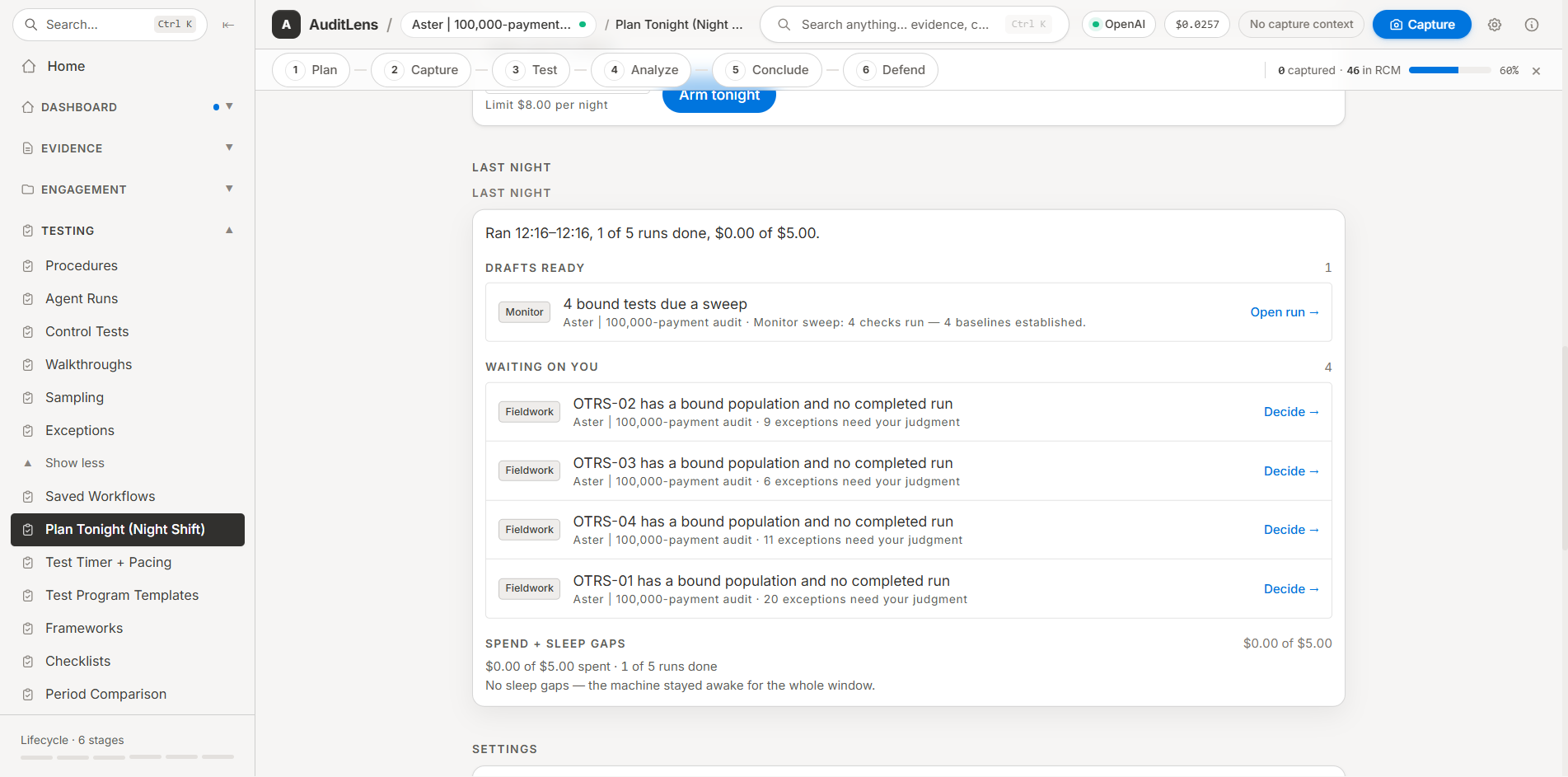
Implement a framework pack — Treasury & Cash, ITGC, and others — and each control becomes a real test in your engagement. Bind the automatable ones to data and let the agent run the fieldwork steps end to end. It checks every item and brings each exception back to you for disposition.

Your judgment

The agent logs every exception at the lowest severity — it never rates severity, and it never decides risk. Rating and disposition stay yours, in the tracker. The run pauses until you acknowledge or stop it.

  • A control board you can read at a glance. Every control shows its state: exceptions awaiting judgment, or no automated test yet.
  • Remote evidence, read-only. Point the chase agent at an MCP server and it proposes documents matching your open PBC requests. Every fetch is approved here first; nothing is ever written back.
  • Drive it from outside, optionally. Let Claude Desktop or another agent operate AuditLens over localhost. External agents can read state and start work — every judgment still pauses here, for you. Off by default.

Evidence → deliverable

Workpaper Studio out as the file your team already ships

Every screen is hashed, timestamped, figure-numbered and tagged to the control it supports the moment you capture it. Pick the figures and AI drafts an almost-ready Excel workpaper — purpose, procedures, observations, conclusion, evidence index and RCM — which you review and correct.

  • A Risk-Control Matrix in real Excel. Your workpaper of record, in the format your firm already reviews.
  • A standalone audit file. Export the whole engagement — evidence, narratives, findings, sign-offs and the hash chains — as one ZIP with a browser-readable index. No AuditLens and no licence needed to open it, ever.
  • Living workpapers, never overwritten. Roll last period's file forward as tracked changes with no AI involved, or run an AI pre-review that raises unsupported conclusions and missing evidence refs as Word comments — the text itself is never edited.

Six stages, one workstation

The engagement has a spine

AuditLens keeps the whole engagement on one rail, visible from every screen. You always know which stage you are in, what has been captured, and how much of it has reached the Risk-Control Matrix.

1

Plan & scope

Open the framework library and implement a control pack. Each control in scope becomes a real test in your engagement, with counts for what is implemented, automatable and bound to data.

2

Capture evidence

Grab a screen from anywhere with the global hotkey. It is hashed, timestamped, figure-numbered, risk-rated and tagged to a control before it lands in the engagement.

3

Test & reperform

Run a population test across every row, build a bespoke tool in Tool Studio, or hand the fieldwork steps to the agent. Reperformance runs locally against your files.

4

Analyze & investigate

Work the exception tracker: rate severity, set disposition, cross-reference evidence, and chase what is missing against your open PBC requests.

5

Conclude & report

Draft the workpaper from the figures you picked, export the Risk-Control Matrix to Excel, and keep the file living with tracked-change roll-forward and AI pre-review.

6

Defend & sign off

Sign-offs bind to the exact version of the thing signed. Export a standalone audit file with evidence, findings, sign-offs and hash chains that opens in any browser, forever.

What is in the box

Everything the engagement needs on one machine

One workstation replaces the sampling calculator, the screenshot folder, the macro workbook nobody can review, and the Word template you rebuild every year.

Global hotkey capture

Press Ctrl Shift S from any application. Mark up the selection before you confirm it, and it lands tagged and numbered.

SHA-256 hash chains

Evidence is hashed on capture and the chain travels with the export. Tamper-evident by construction, not by policy.

Evidence Connectors

Pull populations straight from SAP, Dynamics, Oracle, NetSuite or any REST endpoint — or drop in a CSV/XLSX extract.

Exception tracker

Every failed row and every agent finding lands in one queue. Severity and disposition are set by you — the AI never rates risk.

Framework library

Implement a whole control pack in one action. Treasury & cash, IT general controls and more — each control becomes a live test with its own state.

AI pre-review

A reviewer pass on your Word workpaper: unsupported conclusions, vague quantities and missing evidence refs raised as comments on the exact sentence. Your text is never edited.

Roll forward a period

Copy last period's workpaper to a new file with each date pair applied as a tracked change and a re-perform banner. No AI involved at all.

Live cost metering

Your provider and your running spend sit in the title bar. The recorded ITGC engagement on this page cost 22 cents of AI end to end.

Version-bound sign-off

Approving a tool records a signed event against that exact code. Unattended continuous monitoring only unlocks for signed-off versions.

Command palette

Search anything in the engagement with Ctrl K — controls, evidence, findings, tools.

Bring your own model

OpenAI, Anthropic Claude or Google Gemini, switchable per task — or let AuditLens choose the cheapest that will do the job.

Tool library

Save, import and share tools across engagements. Every tool carries its methodology log into the workpapers.

PII redaction

Detect and redact identifiers before evidence leaves your machine, with a compliance trail for every redaction.

Local-first by architecture

Your data never touches our servers

There is no AuditLens server in the path — not for evidence, not for populations, not for workpapers. The engagement lives in a folder on your machine. When you ask for AI drafting, the request goes from your machine straight to your provider on your own API key.

Tools run locally, at zero marginal cost

One AI call writes the tool. Every run after that is Node on your laptop against your files — the data itself is never sent to a model.

Remote evidence is read-only

MCP sources are searched and fetched only after you approve each fetch. Nothing is ever written back to a client system.

The audit file outlives the licence

Export the engagement as a ZIP with a browser-readable index. Opening it needs no AuditLens, no licence and no internet — ever.

Where your data goes

Your machine

Evidence, populations, tools, workpapers, hash chains and sign-offs. All of it, on disk, in your engagement folder.

only when you ask for AI drafting — on your key
Your AI provider

OpenAI, Anthropic or Google enterprise API. Direct from your machine, billed to you, revocable by you.

never
An AuditLens server

There isn't one. We never see your evidence, your findings or your clients.

Pricing

Buy it once, own it

No seats, no per-engagement fees, no subscription required.

AuditLens

Windows desktop · one-time purchase

$499 once

Core app + 12 months of framework updates

+ AI billed by your provider — the recorded engagement cost $0.22

  • Population testing across 100 % of a listing, with row-level provenance
  • Tool Studio — build analysis tools in plain English, run them locally
  • Agent-assisted fieldwork with human judgment gates on every exception
  • Framework library, control packs and the exception tracker
  • Hotkey capture with SHA-256 hashing, figure numbering and control tagging
  • Workpaper Studio: Excel RCM, AI-drafted workpapers, Word editor
  • Living workpapers — tracked-change roll-forward and AI pre-review
  • Evidence Connectors, MCP evidence chase and PII redaction
  • Standalone audit file export that opens without AuditLens, forever
Continued updates $59/year

Optional renewal for framework and control-pack updates after your first 12 months. The app you bought keeps working without it.

Buy Now — Download Instantly

Secure payment via Lemon Squeezy. Instant .exe download after purchase.

Questions

Frequently asked

If it tests 100 % of the population, what happened to sampling?
Population testing is the default because it is strictly better evidence when you can get the full listing: no sample to defend and no extrapolation to argue about in review. Deterministic rules decide most rows, AI drafts a call only on the ambiguous residue, and those rows stay flagged for your confirmation. Sampling still has its place where a full population genuinely is not obtainable, and the methodology blueprints in Tool Studio cover sampling approaches.
Do I have to trust AI-generated code in my workpapers?
No — you review it in review language, not source. Every tool AuditLens builds comes with a methodology sheet drafted from the code: purpose, population, step-by-step logic, the exception definition and the tool's limitations. That sheet is what a reviewer reads and signs; the code is the appendix. You can edit the sheet until it says exactly what you would defend, and re-draft it from the code at any time. Approving a tool records a sign-off bound to that exact code version — change the code and the sign-off does not carry over.
Does the agent decide whether something is a finding?
It does not. The agent performs the fieldwork steps and logs every exception it hits at the lowest severity — it never rates severity and it never decides risk. The run then pauses and hands the exceptions to you: acknowledge and let it continue drafting, or stop and investigate first. Rating and disposition happen in the exception tracker, by you.
Is my client data secure?
There is no AuditLens server in the path. The engagement lives in a folder on your machine, and AI requests go from your machine directly to your provider's enterprise API on your own key, which you can revoke at any time. Tools that Tool Studio builds run locally against your files — the data itself is never sent to a model, only the description you wrote. Remote MCP evidence sources are read-only and every fetch is approved by you first.
What does the AI actually cost to run?
Very little, because most of the work is not AI. The full ITGC engagement recorded on this page — eight pieces of evidence captured, analysed, drafted into workpapers and exported — cost $0.22 in total. Building a tool in Tool Studio is a single AI call; every subsequent run of that tool is free because it executes on your machine. Your current provider and running spend are always visible in the title bar.
What does my team get at the end of the engagement?
Ordinary files. A Risk-Control Matrix as real Excel, workpapers as real Word and Excel documents, exceptions as CSV, and a standalone audit file — one ZIP containing the evidence, narratives, findings, sign-offs and hash chains behind a browser-readable index. That ZIP needs no AuditLens and no licence to open, so your work outlives your subscription and survives any archive review.
Can I roll last year's workpaper forward?
Yes, and without AI touching it. Roll forward copies last period's .docx to a new file, applies each period pair as a tracked change, and adds a re-perform banner. Separately, AI pre-review can pass over a workpaper and raise unsupported conclusions, vague quantities and missing evidence references as Word comments on the exact sentences — comments you accept or reject in Word. Neither operation ever overwrites your text.
Where do populations come from?
Evidence Connectors pull them from SAP, Dynamics, Oracle, NetSuite or any REST endpoint, and you can always drop in a CSV or XLSX extract instead. You can also point the chase agent at an MCP server exposing search and fetch tools, and it will propose documents matching your open PBC requests for your approval — read-only, always.
Which AI providers and operating systems are supported?
AuditLens runs on Windows 10 and 11 (64-bit). It works with OpenAI, Anthropic Claude and Google Gemini on your own API key, switchable per task — or you can let AuditLens pick the cheapest model that will do the job. Mac and Linux builds may follow.
What is the refund policy?
Because this is a digital product delivered instantly, all sales are final and no refunds are provided. The recordings on this page are unedited captures of the shipping app — please watch them and read the feature list carefully before buying. Full terms are in our Refund Policy.

Test everything. Defend all of it.

Put the sampling calculator, the screenshot folder and the unreviewable macro workbook away. One workstation, six stages, and an audit file that outlives the licence.

Get AuditLens

$499 one-time · Instant download · Windows 10 / 11